Test and publish an agent
Calls always run a published version of an agent, never the draft. Before you publish, the editor checks the draft is complete, and you can try it yourself as many times as you like. Publishing freezes the saved draft as the next version.
Before you start
- An agent exists. To publish, you are a workspace admin.
Check the publish checklist#
On the agent’s page, the card Before you publish v2 (the number is the next version) lists what a publish needs. Each line not yet done has Fix, which opens the section that fixes it.
| Check | Shown when it isn’t done |
|---|---|
| A voice is picked | No voice picked yet |
| The agent has a name | Agent name is empty |
| The opening has a greeting | Greeting is empty |
| The opening says it is an AI | AI disclosure line is empty |
| At least one question (video: one topic) | No questions yet (video: No topics yet) |
| Everything else checks out | How many other problems there are, and the section with the first one |
Review & publish v2 stays unavailable until every line is ticked.
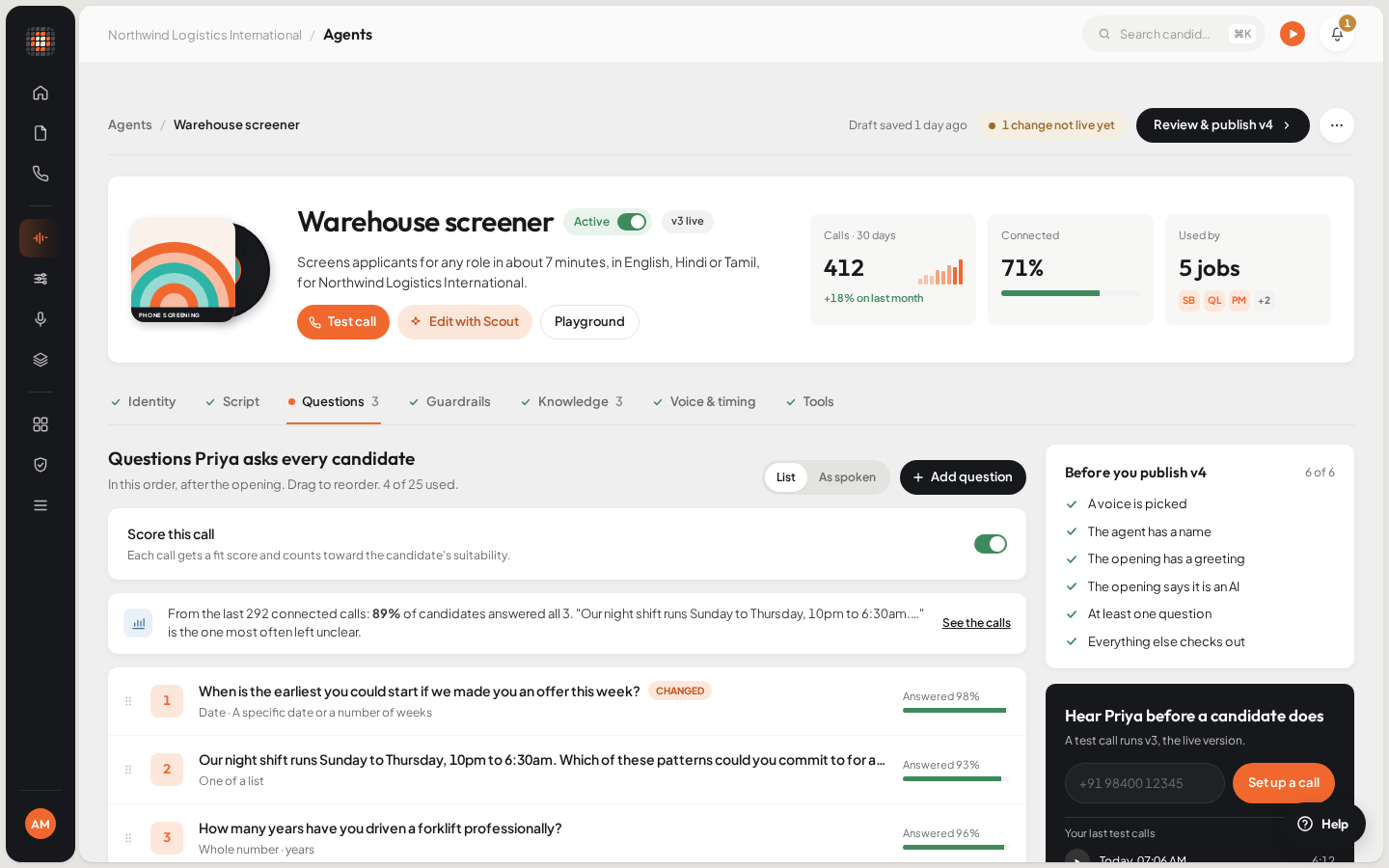
The agent editor, with the publish checklist on the right.
- 01Test call
- 02Playground: talk to the agent in your browser
- 03The editor's sections
- 04Call your own phone with the live version
Test it yourself#
There are three ways to try an agent before candidates hear it.
Call your own phone#
The test call card on a phone agent’s page calls you with the live (published) version, so publish a version and leave the agent switched on first. Until then the card says Publish a version to place a test call.
Type your phone number into the card.
Click Call me.
ResultYour phone rings and the agent runs its script. Your recent test calls appear under Your last test calls, with their recordings when there are any.
If your workspace has more than one number to call from, or the script needs values you fill in per call, the button says Set up a call and opens a dialog for them. A test call is a real phone call: it needs a number to call from and calling credit. On the free trial it rings only your test number (see Calls aren’t going out).
Talk to it in the browser#
Click Playground on the agent’s page, or on the Agents page.
- From the Agents page, pick the agent in the Agent menu first.
Under What this call runs, choose The draft or The published version.
- The draft tests your latest saved draft. It leaves no call record, no transcript and no recording.
- The published version runs the live version and does create a call record, with a transcript when it ends.
Fill in any Variables the agent asks for, then start the call and allow your microphone.
ResultYou talk to the agent. Use End the call to finish, or Call again to start over.
Take a video interview yourself#
A Video Interview agent has Try it as a candidate instead. It takes you to Try it yourself: pick a job and click Open test link to take the interview in a new tab, the way a candidate would. Nothing goes to the job or the ATS.
Free test minutes#
Browser tests in the Playground are free and share a daily allowance of 30 minutes across the workspace. The Playground shows how many are left today. The allowance resets at midnight, India time. When it runs out, Scout shows Test Minutes Used Up: “Today’s 30 free test minutes are used up. They come back at midnight.” Real calls to candidates aren’t affected.
Publish a version#
On the agent’s page, click Review & publish v2 (the number is the next version).
- Scout saves any pending edits first.
ResultThe Publish version 2 dialog opens.
Optionally, describe what changed under Notes (optional), for example “Shortened the opening, added the notice-period question”.
Click Publish v2.
ResultThe new version is live. The page shows it, for example “v2 live”, and new calls run it.
Publishing checks the script once more. If it finds a problem, the dialog stays open under The compiler rejected this draft with the reason. Fix it in the editor and publish again.
See earlier versions#
Open the agent’s More actions for this agent menu (⋯) and choose Version history. Published versions lists every version with when it was published and its notes, and you can open each one to read it as it was frozen. The versions card on the agent’s page also shows how many calls each version has run.
Pause or archive an agent#
- Pause: switch off Agent is active on the agent’s page. A paused agent can’t be dialled, but you can still edit it. Switch it on again to resume.
- Archive: in the ⋯ menu, choose Archive this agent, then Archive. It’s hidden from the list and can’t be dialled or edited. Nothing is deleted: its versions, calls and answers stay. To bring it back, choose Un-archive this agent.
If a test won’t start#
| What you see | What it means |
|---|---|
| Publish a version to place a test call. | The test call runs the live version, and there isn’t one yet. Publish, or use the Playground with The draft. |
| Agent Not Ready | The version has a setup problem Scout won’t run a call with. Scout lists what to fix first. |
| Test Minutes Used Up | Today’s free browser test minutes are used. They come back at midnight, India time. |