How workflows call candidates
A workflow tells Scout which agent contacts a candidate at which stage of your pipeline. You build it once, then assign it to every job that shares that pipeline. Read this to understand why Scout did, or didn’t, call someone.
What a workflow is#
A workflow is a list of your pipeline’s stages, each with the agent that acts there, or Nobody calls. The stages come from the workflow’s source: one ATS connection, or Manual jobs (no ATS) for jobs you add to Scout yourself. Stage names are used exactly as the source spells them.
One workflow can screen many jobs. A job has at most one workflow, and only a workflow from the job’s own source can be assigned to it. Changing a stage in the workflow changes it on every job assigned to it.
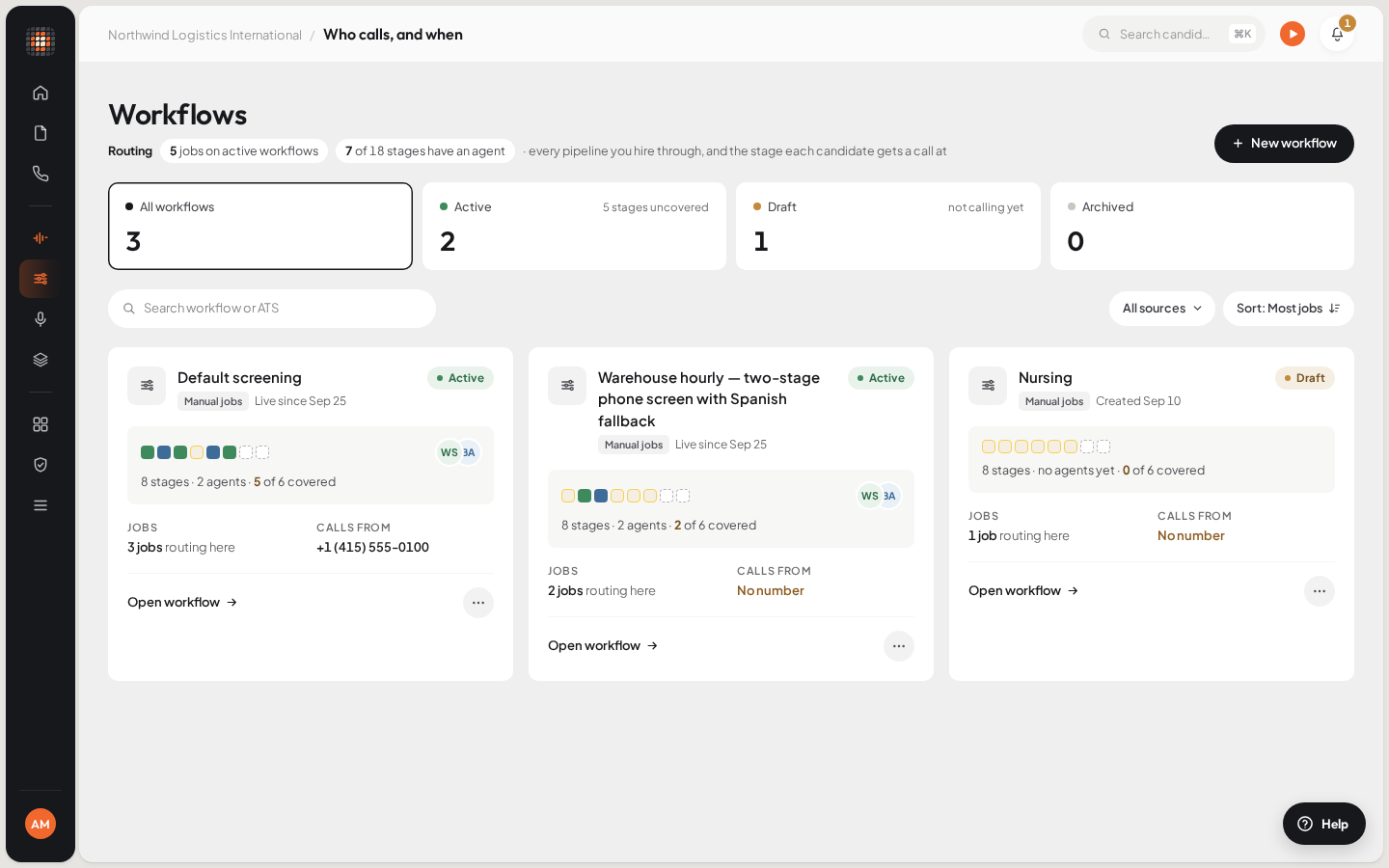
Each card shows a workflow’s stages, how many have an agent, its jobs and the number it calls from.
- 01New workflow
- 02A draft workflow calls no one
- 03The number the workflow calls from
- 01Map stagesPick an agent for each stage you want covered.
- 02ActivateScout checks every agent can take a call on its own.
- 03Assign to jobsOpen a job’s Job details, or assign many from the Jobs list.
- 04Candidate enters a stageMoved in your ATS, on the board, or added straight into it.
- 05Scout callsWithin calling hours in the candidate’s own time, with retries if they don’t answer.
What happens at a stage#
What Scout does when a candidate enters a stage depends on the type of agent you picked for it:
| Agent at the stage | What happens |
|---|---|
| Phone Screening or Interview Scheduling | The agent phones the candidate. |
| Video Interview | Scout emails the candidate a link to an AI video interview instead of calling. |
| Reference Check | The agent calls the candidate’s references, not the candidate. |
| Nobody calls | Nothing. The candidate waits in the stage. |
Scout calls a candidate once for each stage. A Phone Screening or Interview Scheduling stage can be set to Call again while they stay in this stage, every few days, until the candidate moves on.
When calls ring#
- Automatic calls ring only inside the workspace’s calling hours, in the candidate’s own local time. A call due outside them is held until the next opening.
- If nobody answers, Scout tries again after the gap set in Next try, up to Tries per candidate. It never retries after a real conversation or a declined call.
- When every line your plan includes is busy, the call waits a few minutes and tries again.
- All the stages of one workflow call from the same number: the one picked in Calls from.
Follow-ups and incoming calls#
Two jobs a workflow does aren’t tied to a stage. Each one takes an agent, set in the workflow under Beyond the pipeline:
- `Follow-ups`: the agent that calls when you send follow-up items from a call. See Call a candidate now and follow up.
- `Incoming calls`: the agent that answers when someone rings the workflow’s number. By default, a candidate in a stage with a phone agent reaches that stage’s agent instead.
What doesn’t trigger a call#
Scout calls only on a move into a mapped stage that happens after the workflow is in place. These never start an automatic call:
- Candidates already in a stage when you assign the workflow, or when a stage first gets an agent. Only moves Scout sees from then on count.
- Applicants already in your ATS pipeline when Scout first syncs a job.
- A draft workflow. It can’t be assigned to a job until it’s active.
- A stage set to Nobody calls.
- A job that is closed.
- A stage the candidate was already called for.
- A resume below the workflow’s or job’s minimum Resume match, on Scout’s first call. A missing or unreadable resume skips this check.
- A candidate who asked not to be called again about the job. You can still use Call now.
- No dialable phone number, or a number already called for another candidate in your workspace.
- An agent that is switched off, has no published version, or has setup left to finish.
- No number to call from, or no calling credit left. Calls missed this way are not placed later on their own.
Still stuck? Work through Calls aren’t going out.