Calls aren’t going out
Scout calls a candidate automatically only when every condition below holds. Work through them in order: the first one that fails is almost always the reason.
Check in this order#
Start in Call logs: when Scout holds or skips an automatic call, it logs it there (and on the candidate’s Timeline) as Call scheduled or Not called, with the reason. The reason usually points straight at one of these:
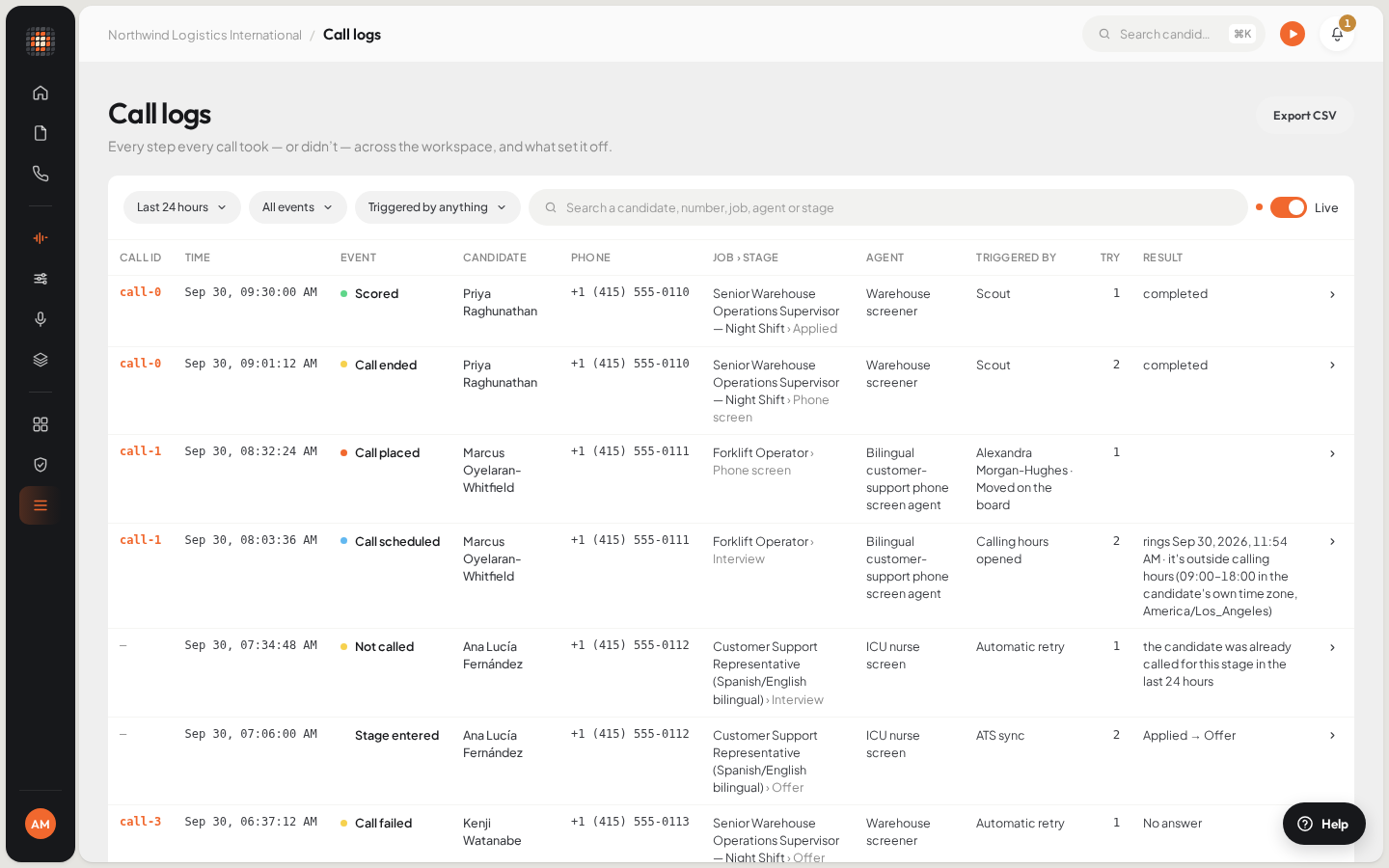
Call logs shows every step of every call, including calls Scout held back and why.
- 01Export CSV
- The workflow is active, not a draft.
- The candidate’s stage has an agent in that workflow.
- The job is assigned to that workflow.
- It is within calling hours in the candidate’s own time.
- There is a number to call from.
- There is credit left, and a free line.
- A test number isn’t catching the calls.
- Something else holds the call back, such as the resume-match minimum or an opt-out.
The workflow is still a draft#
A new workflow starts as a draft. When you create it, the dialog says so: Draft — nothing calls candidates until you activate this workflow. Afterwards the workflow shows a Draft label. Drafts never call anyone.
Open Workflows in the sidebar and select the workflow.
Click Activate.
ResultThe workflow is live. Candidates who enter a stage with an agent from now on get called.
The candidate’s stage has no agent#
A workflow calls only at the stages where you picked an agent. If a stage still shows Pick who calls, a candidate in that stage waits there. Open the workflow and choose an agent for the stage, then save. See Create and activate a workflow.
The job has no workflow#
A workflow only acts on the jobs assigned to it. Open the job in Jobs, go to Job details and use Assign a workflow. To assign many jobs at once, select them in the Jobs list and use Assign workflow. See Assign a workflow to jobs.
It’s outside calling hours#
Automatic calls only ring inside the workspace’s calling hours, in the candidate’s own time, worked out from their phone number. When a number doesn’t say which time zone it is in, Scout uses the workspace time zone. A call that falls outside the hours waits for the next opening.
Admins set the hours in Account settings › Calling: the days, From and Until, and the Workspace time zone. See Calling hours, retries and time zones.
There’s no number to call from#
Automatic calls need a number attached to the workflow. Without one, Call logs shows the call as Not called because “the workflow has no phone number attached”; dialling by hand shows No Number To Call From. An admin can pick a number under Calls from in the workflow, or buy one in Integrations › Phone numbers. See Get a phone number.
On the free trial, calls come from Scout’s shared trial line instead, which rings only your own test number (see below).
You’re out of credit#
When the plan credit and the balance are both used up, Scout shows Out Of Credit: “You’re out of calling credit. Add money to resume calls.” No new calls start until an admin adds money. A call already in progress is never cut off. See Billing, credit and plans.
All lines are busy#
Your plan includes a number of calls at once. When they are all in use, Scout shows All Lines Busy and the next call waits for one to end. To run more calls at the same time, an admin can upgrade the plan or add capacity in Billing.
A test number is catching the calls#
In Account settings › Test Call, the Test Call Number redirects every call to a candidate to that number instead, and the call log shows that number. It’s meant for trying Scout on yourself. Clear it and save when you’re ready to call candidates.
On the free trial, calls come from Scout’s shared trial line and ring only this number. If it’s empty, Scout shows Add Your Test Number. Add your own number there to try Scout on yourself.
Other reasons a call is held back#
A few more conditions stop an automatic call even when everything above is set up: the job is closed, the candidate asked not to be called, their resume match is under the job’s minimum, or they were already in the stage before the workflow was assigned. What doesn’t trigger a call lists them all.
If a call was placed but nobody answered, Scout tries again after the gap set in Next try, up to Tries per candidate.